

yum error: Couldn’t fork Cannot allocate memory

yum error: Couldn’t fork Cannot allocate memory

I’ve been doing some awesome things to a new VM for work, namely installing CouchDB, Apache and running Node.JS apps along side a WordPress plugin using Angular.JS. It’s pretty cool. But computer’s are dicks so when it came down to installing Monit to ensure everything was lovely I got the following error: Couldn’t fork %pre(monit-5.5-1.el6.rf.x86_64): Cannot allocate memory. Bum.

error: Couldn’t fork %pre(monit-5.5-1.el6.rf.x86_64): Cannot allocate memory

Seem’s simple enough, for whatever reason Yum cannot allocate memory, so lets take a peak

Speeding Up MDADM RAID Rebuilds

Speeding Up MDADM RAID Rebuilds

Speeding Up MDADM RAID Rebuilds I’m slowly migrating a bunch of awesome things from a really old server, it’s still running Ubuntu 10.04.. to a really nice and shiny one. Which has 2 new 3TB HDDs in RAID 1, which are syncing..

<br /> cat /proc/mdstat<br /> md3 : active raid1 sda4[0] sdb4[1]<br /> 1847478528 blocks super 1.2 [2/2] [UU]<br /> [>....................] resync = 0.1% (2061952/1847478528) finish=28857.9min speed=1065K/sec<br />

authorized_keys vs authorized_keys2

authorized_keys vs authorized_keys2 Earlier today I was setting up a brand new server for a migration and just as I was typing scp .ssh/authorized_keys2 my brain went and asked a question..

What is the difference between authorized_keys and authorized_keys2?

I’ve been working with Linux for well over a decade and some of my practices stem from things I learned in the ’90s that still work, putting all my public keys in ~/.ssh/authorized_keys2 is one of those things.

do-release-upgrade Checking for a new Ubuntu release No new release found

My HTPC is almost appliance like, in the way I never upgrade it, i.e. this morning it was still running Ubuntu 11.04 Natty Narwhal… It’s also not very appliance like in that it’s also full of random development stuff that probably shouldn’t be on it as well as several different types of databases, my backup infrastructure and tons of other things you really don’t care for.

But not today. Today I was bored and decided the best use of my time was to replace MythTV with XBMC. Not only that, I figured I should probably upgrade from

sudo: sorry, you must have a tty to run sudo

sudo: sorry, you must have a tty to run sudo

We’re using an old version of Upstart, on Centos, to manage stopping and starting our Node.js daemons, and one of the things the script does, like any good deamon, is change the user of the deamon process from root to something more applicable, security and all that 😉

The scripts look a little like this

!upstart
description "Amazing Node.js Daemon"
author "idimmu"
start on runlevel [2345]
stop on shutdown
env PATH=/usr/local/sbin:/usr/local/bin:/sbin:/bin:/usr/sbin:/usr/bin
env NAME="amazing-daemon"
script
export HOME="/root"
cd /opt/idimmu/$NAME
echo $$ > /var/run/$NAME.pid
exec sudo -u idimmu /usr/bin/node /opt/idimmu/$NAME/server.js >> /var/log/$NAME/stdout.log 2>&1
end script
pre-start script
echo "[`date -u +%Y-%m-%dT%T.%3NZ`] (upstart) Starting $NAME" >> /var/log/$NAME/stdout.log
end script
pre-stop script
rm /var/run/$NAME.pid
echo "[`date -u +%Y-%m-%dT%T.%3NZ`] (upstart) Stopping $NAME" >> /var/log/$NAME/stdout.log
end script

Which is nice, as it means we can use Upstart to stop/start/status deamons really nicely. The equivalent init.d script looked really horrible.

pv – Pipe Viewer – My New Favourite Command Line Tool

pv – Pipe Viewer – My New Favourite Command Line Tool

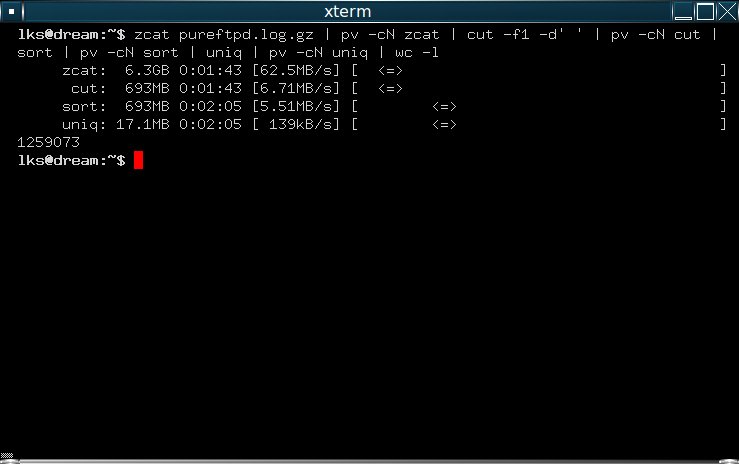
Pipe Viewer I’ve got a rather large dataset that I need to do a lot of processing on, over several iterations, it’s a 20gb zip file, flat text, and I’m impatient and don’t like not knowing things!

My new favourite Linux command line tool, pv (pipe viewer) is totally awesome. Check this out:


<br /> pv -cN source < urls.gz | zcat | pv -cN zcat | perl -lne '($a,$b,$c,$d) = split /\||\t/; print $b unless $b =~ /ac\.uk/; print $c unless $c =~ /ac\.uk/' | pv -cN perl | gzip | pv -cN gzip > hosts.gz<br /> zcat: 93.4GiB 1:33:18 [26.6MiB/s] [ <=> ]<br /> perl: 85.7GiB 1:33:18 [25.3MiB/s] [ <=> ]<br /> source: 13.2GiB 1:33:17 [3.57MiB/s] [===============================================> ] 67% ETA 0:44:41<br /> gzip: 12.7GiB 1:33:18 [3.51MiB/s] [ <=> ]<br />

Enable Linux Core Dump

Enable Linux Core Dumps One of our applications (Freeswitch) just randomly crashed for no apparent reason and didn’t write anything to it’s log files. The service we’re trialling is currently in Beta so there’s room to muck about and do some diagnostics. I want to make the kernel dump a core file whenever Freeswitch dies, in case it happens again, so that we have some stuff to work with after the fact. It’ll also shut up my QA manager.



CouchDB {“error”:”insecure_rewrite_rule”,”reason”:”too many ../.. segments”}

CouchDB {“error”:”insecure_rewrite_rule”,”reason”:”too many ../.. segments”}
couchdb

Whilst working an AMAZING NPM repository mirror yesterday (which totally works, despite not really offering the performance benefit I’d hoped, because NPM is rubbish) I came across this error whilst doing things


<br /> 16 http GET https://localhost:5984/registry/_design/app/_rewrite/-/all/since?stale=update_after&startkey=1371737164294<br /> 17 http 500 https://localhost:5984/registry/_design/app/_rewrite/-/all/since?stale=update_after&startkey=1371737164294<br /> 18 error Error: insecure_rewrite_rule too many ../.. segments: registry/_design/app/_rewrite/-/all/since<br /> 18 error at RegClient.<anonymous> (/root/.nvm/v0.8.15/lib/node_modules/npm/node_modules/npm-registry-client/lib/request.js:259:14)<br /> 18 error at Request.init.self.callback (/root/.nvm/v0.8.15/lib/node_modules/npm/node_modules/request/main.js:120:22)<br /> 18 error at Request.EventEmitter.emit (events.js:99:17)<br /> 18 error at Request.<anonymous> (/root/.nvm/v0.8.15/lib/node_modules/npm/node_modules/request/main.js:648:16)<br /> 18 error at Request.EventEmitter.emit (events.js:126:20)<br /> 18 error at IncomingMessage.Request.start.self.req.self.httpModule.request.buffer (/root/.nvm/v0.8.15/lib/node_modules/npm/node_modules/request/main.js:610:14)<br /> 18 error at IncomingMessage.EventEmitter.emit (events.js:126:20)<br /> 18 error at IncomingMessage._emitEnd (http.js:366:10)<br /> 18 error at HTTPParser.parserOnMessageComplete [as onMessageComplete] (http.js:149:23)<br /> 18 error at Socket.socketOnData [as ondata] (http.js:1367:20)<br /> 19 error If you need help, you may report this log at:<br /> 19 error <https://github.com/isaacs/npm/issues><br /> 19 error or email it to:<br /> 19 error <npm-@googlegroups.com><br />

Think Carefully About Your Clever Project Names

Think Carefully About Your Clever Project Names

Idiot We’re building a new exciting cluster at work using Linux HA and stuff to make it work magically.

In the olden days of yore RedHat and co were using Pacemaker with the old crm (Cluster Resource Manager / Cluster Relationship Manager, pick one..) tool for cluster management, which was nice. Now it looks like RedHat have removed the crm command from their repositories and have switched to PCS which stands for either Pacemaker/Corosync Configuration System or is the plural of PC (Personal Computers).

Installing Magento

Installing Magento

Installing Magento One of my clients wanted an E-Commerce solution for his website and after a little bit of analysis we opted for the community edition of Magento.

We wanted something based on the usual LAMP stack, that was OpenSource so it could be extended, was free as in beer, had great international support, was fully featured and enterprise ready, could pass PCI DSS compliance, allowed reasonable payment gateway options, could scale and was easy to extend as well as backup. Also we wanted complete control of the deployment, rather than integrating with a 3rd party cloud service provider such as Shopify to keep costs down and retain flexibility.

monit: error connecting to the monit daemon

monit: error connecting to the monit daemon
monit: error connecting to the monit daemon We’re rolling out monit on our new platform at the request of a vendor to manage their new service. I’ve always been dead against these kinds of automated failure recovery tools as they often require human intervention after the fact anyway and all the platforms I’ve managed will have failed the server anyway so why not restart the services after the root cause analysis is done? My tune is slowly changing though and I’m coming to appreciate this method of systems recovery a lot more.

Experiments In Bitcoin

Experiments In Bitcoin
bitcoin Earlier today I got in to discussing Bitcoin Arbitrage with a mate of mine, with the cunning plan of creating a bot to monitor different exchanges and profit on the difference in trading prices. After an analysis this was deemed a silly idea, or conversely we aren’t good enough, as moving real money or bitcoins around the exchanges seems to be an extremely painful process. The first step though was creating a wallet!

10 Most Used Linux Commands

Whilst skimming my Bash history today looking for an esoteric one liner I’d written earlier I started to ponder what my most used commands were, it’s easy enough to find out! This is actually output from my Mac, not a Linux box, I tricked you 😀

<br /> Chill:~ rus$ history | awk {'print $2'} | sort | uniq -c | sort -nr | head -n 10<br /> 106 ssh<br /> 49 ls<br /> 44 cd<br /> 42 curl<br /> 34 scp<br /> 25 vi<br /> 15 mv<br /> 15 cp<br /> 12 grep<br /> 10 rm<br />

Syntax Highlighting In VIm

Syntax highlighting in vim can be super tricky, by default a lot of desktop environments seem to have white terminals, which is a bit dumb as it’s easier to read white on black than black on white, as such the default vim syntax highlighting is often unreadable if you have a black terminal, giving blue comments on a black background and the like.

The fix for this is to set your vim background to dark, e.g.

Installing OpenSIPS on Redhat Enterprise Linux 5

We’ve got to set up a SIP Registrar for a fantastic new project that one of our clients recently announced 😉 on RHEL5 so we’re going to trial OpenSIPS, backed with MySQL to see how it performs.

There’s a RHEL5 repository mirror here https://centos.leurent.eu/ that I’ve mirrored locally. If you don’t know how to create your own repositories you can read about that here.

First off I installed the opensips-mysql.x86_64 package to guarantee we pull in OpenSIPS as well as it’s MySQL dependencies.

Iptables Block Outgoing Traffic

We need to give one of our customers to an internal server, for this we’ve enabled remote SSH access. Even though we trust them we don’t want anyone to use the server as a launchpad to attack other remote servers, or a launch pad to attack internal servers for that matter, in case their account and SSH keys are compromised. So to prevent this we are using iptables to block outgoing traffic from the external IP.

BackupPC ping too slow

Whilst adding a new remote server to our BackupPC configuration, it threw the following error

`
Contents of file /Volumes/2TB/backuppc/pc/www.server.co.uk/LOG.102011, modified 2011-10-25 13:10:23

2011-10-25 12:00:00 ping too slow: 22.21msec
2011-10-25 13:00:01 ping too slow: 49.63msec
2011-10-25 13:10:23 ping too slow: 47.79msec
`

and refusing to back up the server! After browsing the documentation I discovered the following configuration option

<br /> $Conf{PingMaxMsec} = 20;<br />

Maximum round-trip ping time in milliseconds. This threshold is set to avoid backing up PCs that are remotely connected through WAN or dialup connections. The output from ping -s (assuming it is supported on your system) is used to check the round-trip packet time. On your local LAN round-trip times should be much less than 20msec. On most WAN or dialup connections the round-trip time will be typically more than 20msec. Tune if necessary.

Linux Command Line AVI Repair

List Contents Of An RPM Package

Often when building RedHat RPM packages I want to make sure that the package built correctly and all the files are present before I actually install the RPM, but I do keep forgetting the command to do this, so here it is for prosperity!

<br /> rpm -qlp<br />

e.g.

<br /> root@build:/usr/src/redhat/SPECS# rpm -qlp ../RPMS/noarch/servicemap-0.16-1.noarch.rpm<br /> /var/www/html/servicemap<br /> /var/www/html/servicemap/amq.png<br /> /var/www/html/servicemap/amqfail.png<br /> /var/www/html/servicemap/amqreportingprov1prov1.png<br /> /var/www/html/servicemap/amqreportingprov1prov2.png<br /> /var/www/html/servicemap/amqreportingprov2prov1.png<br /> /var/www/html/servicemap/amqreportingprov2prov2.png<br /> /var/www/html/servicemap/amqsdrprov1prov1.png<br /> /var/www/html/servicemap/amqsdrprov1prov2.png<br /> /var/www/html/servicemap/amqsdrprov2prov1.png<br /> /var/www/html/servicemap/amqsdrprov2prov2.png<br /> /var/www/html/servicemap/amqslee1fail.png<br /> /var/www/html/servicemap/amqslee1prov1.png<br /> /var/www/html/servicemap/amqslee1prov2.png<br /> /var/www/html/servicemap/amqslee2fail.png<br /> /var/www/html/servicemap/amqslee2prov1.png<br /> /var/www/html/servicemap/amqslee2prov2.png<br /> /var/www/html/servicemap/amqvqeprov1prov1.png<br /> /var/www/html/servicemap/amqvqeprov1prov2.png<br /> /var/www/html/servicemap/amqvqeprov2prov1.png<br /> /var/www/html/servicemap/amqvqeprov2prov2.png<br /> /var/www/html/servicemap/amqwebserviceprov1prov1.png<br /> /var/www/html/servicemap/amqwebserviceprov1prov2.png<br /> /var/www/html/servicemap/amqwebserviceprov2prov1.png<br /> /var/www/html/servicemap/amqwebserviceprov2prov2.png<br /> /var/www/html/servicemap/checks.php<br /> /var/www/html/servicemap/config.php<br /> /var/www/html/servicemap/hash.png<br /> /var/www/html/servicemap/index.php<br /> /var/www/html/servicemap/nagios.php<br /> /var/www/html/servicemap/script.php<br /> /var/www/html/servicemap/sleevipactivenotok.png<br /> /var/www/html/servicemap/style.php<br /> /var/www/html/servicemap/ttprov1.png<br /> /var/www/html/servicemap/ttprov1prov2.png<br /> /var/www/html/servicemap/ttprov2.png<br /> /var/www/html/servicemap/ttprov2prov1.png<br /> /var/www/html/servicemap/ttprovfail.png<br /> /var/www/html/servicemap/ttslee1.png<br /> /var/www/html/servicemap/ttslee1slee2.png<br /> /var/www/html/servicemap/ttslee2.png<br /> /var/www/html/servicemap/ttsleefail.png<br /> /var/www/html/servicemap/ttvipactivenotok.png<br /> /var/www/html/servicemap/ttvipactiveok.png<br />