do-release-upgrade Checking for a new Ubuntu release No new release found

My HTPC is almost appliance like, in the way I never upgrade it, i.e. this morning it was still running Ubuntu 11.04 Natty Narwhal… It’s also not very appliance like in that it’s also full of random development stuff that probably shouldn’t be on it as well as several different types of databases, my backup infrastructure and tons of other things you really don’t care for.

But not today. Today I was bored and decided the best use of my time was to replace MythTV with XBMC. Not only that, I figured I should probably upgrade from

sudo: sorry, you must have a tty to run sudo

sudo: sorry, you must have a tty to run sudo

We’re using an old version of Upstart, on Centos, to manage stopping and starting our Node.js daemons, and one of the things the script does, like any good deamon, is change the user of the deamon process from root to something more applicable, security and all that 😉

The scripts look a little like this

!upstart
description "Amazing Node.js Daemon"
author "idimmu"
start on runlevel [2345]
stop on shutdown
env PATH=/usr/local/sbin:/usr/local/bin:/sbin:/bin:/usr/sbin:/usr/bin
env NAME="amazing-daemon"
script
export HOME="/root"
cd /opt/idimmu/$NAME
echo $$ > /var/run/$NAME.pid
exec sudo -u idimmu /usr/bin/node /opt/idimmu/$NAME/server.js >> /var/log/$NAME/stdout.log 2>&1
end script
pre-start script
echo "[`date -u +%Y-%m-%dT%T.%3NZ`] (upstart) Starting $NAME" >> /var/log/$NAME/stdout.log
end script
pre-stop script
rm /var/run/$NAME.pid
echo "[`date -u +%Y-%m-%dT%T.%3NZ`] (upstart) Stopping $NAME" >> /var/log/$NAME/stdout.log
end script

Which is nice, as it means we can use Upstart to stop/start/status deamons really nicely. The equivalent init.d script looked really horrible.


Keeping Linux Users In A MySQL Database With libpam-mysql On Ubuntu

I want to have a set of users on my Ubuntu 10.4 Lucid Lynx box managed by MySQL, rather than LDAP for a change which means delving in to the sexy world that is libpam-mysql!

As ever, the first thing that we need are packages! Remember when installing mysql-server to set a strong root MySQL password. As we’re managing user accounts in MySQL we need to really make sure everything is locked down tight!

Disk Quotas On Ubuntu

I’ve recently needed to add disk usage quotas to a server in order to limit how much data users can store so as not to affect the quality of service for other users.

Linux has a method called quota which can help you do this.

Ubuntu provides some packaged tools which let you manage quotas

apt-get install quota

To enable quotas on a partition the first step is to edit the /etc/fstab entry for the partition and append usrquota to it so the kernel knows to manage that partition using quotas.

Slow SSH and SCP connections on Ubuntu

My home Ubuntu Jaunty installation often takes a good 40-60 seconds to connect to using SSH, none of the other servers I maintain have this same problem, they’re pretty much instantaneous, and today, on a Friday evening at 1am this irked me enough to fix it!

The first step is of course to make the SSH connection with debug output on.

<br /> Chill:~ idimmu$ ssh -v cordy<br /> OpenSSH_5.2p1, OpenSSL 0.9.7l 28 Sep 2006<br /> debug1: Reading configuration data /Users/idimmu/.ssh/config<br /> debug1: Reading configuration data /etc/ssh_config<br /> debug1: Connecting to cordy [192.168.0.10] port 22.<br /> debug1: Connection established.<br /> debug1: identity file /Users/idimmu/.ssh/identity type -1<br /> debug1: identity file /Users/idimmu/.ssh/id_rsa type -1<br /> debug1: identity file /Users/idimmu/.ssh/id_dsa type 2<br /> debug1: Remote protocol version 2.0, remote software version OpenSSH_5.1p1 Debian-5ubuntu1<br /> debug1: match: OpenSSH_5.1p1 Debian-5ubuntu1 pat OpenSSH*<br /> debug1: Enabling compatibility mode for protocol 2.0<br /> debug1: Local version string SSH-2.0-OpenSSH_5.2<br /> debug1: SSH2_MSG_KEXINIT sent<br /> debug1: SSH2_MSG_KEXINIT received<br /> debug1: kex: server->client aes128-ctr hmac-md5 none<br /> debug1: kex: client->server aes128-ctr hmac-md5 none<br /> debug1: SSH2_MSG_KEX_DH_GEX_REQUEST(1024<1024<br /> debug1: expecting SSH2_MSG_KEX_DH_GEX_GROUP<br /> debug1: SSH2_MSG_KEX_DH_GEX_INIT sent<br /> debug1: expecting SSH2_MSG_KEX_DH_GEX_REPLY<br /> debug1: Host 'cordy' is known and matches the RSA host key.<br /> debug1: Found key in /Users/idimmu/.ssh/known_hosts:7<br /> debug1: ssh_rsa_verify: signature correct<br /> debug1: SSH2_MSG_NEWKEYS sent<br /> debug1: expecting SSH2_MSG_NEWKEYS<br /> debug1: SSH2_MSG_NEWKEYS received<br /> debug1: SSH2_MSG_SERVICE_REQUEST sent<br /> debug1: SSH2_MSG_SERVICE_ACCEPT received

Burning an XVid to DVD in Ubuntu Jaunty from the command line

I needed to burn an XVid of one of my performances to DVD last night, remotely, as my MythBuntu box was being used by someone else to watch some crappy TV and I wanted to show off! It was a pretty simple process, just involving a bit of a wait during the transcode 🙂

First you will need to make install the relevent packages:

sudo aptitude install dvdauthor ffmpeg ~nlibav.+-unstripped.+

If you already have dvdauthor and ffmpeg installed, you must install the unstripped libav packages as they contain a tool called mpeg2video and it’s this that does the heavy grunt work!

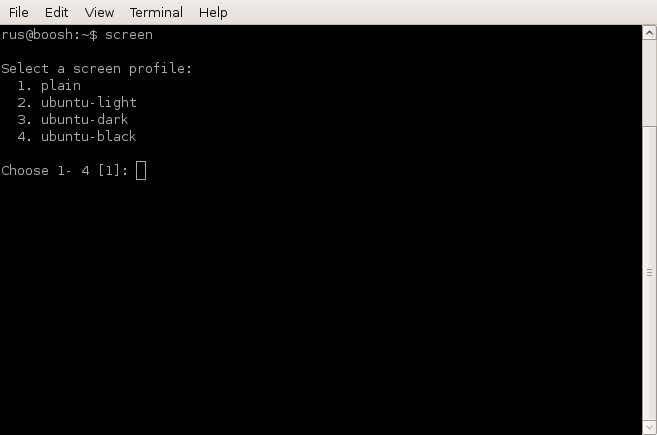
New Ubuntu Jaunty Screen

At the moment I’m trying out the beta for Ubuntu Jaunty and one the first thing I noticed was the new version of screen available!

Initially you are provided with a menu to choose a theme!

I went with option 3, Ubuntu Dark! You’re then presented with an interesting new screen display, with 2 rows of status at the bottom, in lots of colours, displaying information about the CPU and RAM etc!

Error: Could not stat() command file ‘/var/lib/nagios3/rw/nagios.cmd’!

I’ve been doing a lot of Nagios deployments recently, and this error always bites me, on all Ubuntu versions, including Hardy and Intrepid (haven’t quite bit the bullet to try the Jaunty beta yet 🙂 )

<br /> Error: Could not stat() command file '/var/lib/nagios3/rw/nagios.cmd'!

The external command file may be missing, Nagios may not be running, and/or Nagios may not be checking external commands.

An error occurred while attempting to commit your command for processing.

Nexus on Tomcat 5.5 on Ubuntu Hardy

I’m trying out this Continuous Integration fun at the moment.

My end game is to get Hudson, Maven and Nexus working together to continuously build and run unit tests against code, which then gets turned in to Deb packages. A new Xen VM will then be created and configured using Puppet which the new Deb package is then deployed to. Finally Selenium will then be run to automate testing of the deployment.

Thats the plan anyway ..

File Roller and 7zip

Changing deb package architecture

We have several PHP applications and libraries incorrectly packaged for i386 rather than all, which means they wont install to our nice new shiny AMD64 servers. Unfortunately we don’t have (or at least we can’t find) the original package sources, so we need to ‘frobble’ the packages and change the arch by hand!

Deb files are just an ar package so we must first extract it! (FYI ar is like tar, but for pirates .. 🙁 )

Turning CPAN modules in to deb with dh perl make

Some of our PERL tools require some CPAN modules that are not part of the standard Ubuntu distribution. It’s obviously possible to install the module using CPAN but I like using deb packages where possible as then you only have one repository to manage. Fortunately with dh-make-perl it is possible to quickly turn any CPAN module in to a debian package!

First make sure dh-make-perl is installed

<br /> apt-get install dh-make-perl<br />

Apache2 with SSL and Tomcat5.5 on Ubuntu

One of the newer features to our site is an access control mechanism to force specific paths to only be delivered over SSL when our customers have particularly sensitive data. We already use Apache2 with mod_jk to talk to the Tomcat5.5 instance running our app so the only part left is to enable SSL!

First make sure mod_ssl is enabled:

<br /> root@reltest-tcj0:/var/log/apache2# a2enmod<br /> Which module would you like to enable?<br /> Your choices are: actions asis auth_anon auth_dbm auth_digest auth_ldap cache cern_meta cgid cgi dav_fs dav deflate disk_cache expires ext_filter file_cache headers imap include info jk ldap mem_cache mime_magic proxy_connect proxy_ftp proxy_http proxy rewrite speling ssl suexec unique_id userdir usertrack vhost_alias<br /> Module name? ssl<br /> This module is already enabled!<br />

Apache2 ldap auth on Ubuntu Dapper and Feisty

As part of our internal office systems upgrade we have a shiny new LDAP server which we like to use as much as possible. One of the things we use it for is Apache user auth, mainly we control SVN with it so people can only commit to the projects they’re allowed to but we also use it so secure our system’s services from the developers that like to play wannabe sysadmin!

Ubuntu and webcams

I’ve had some debugging to do for work for a part of our site that uses webcams but I’ve been a bit hazey about starting it because the last time I plugged a webcam in to a Linux box, 100 years ago, it was a bit messy. I decided to risk it as I’m too lazy to go home and get my laptop, and .. it .. just .. worked ..

PHP Java Bridge in Ubuntu Gutsy with Lucene

The php/java bridge it a pretty awesome little protocol that basically lets us use java classes inside our own PHP applications! This lets you harness the awesome power of all the Java libraries that exist, including the popular Lucene search engine library.

I referenced two excellent blog entries here and here whilst implementing Lucene search for this blog, but I am writing up the experience anyway to compare issues and difficulties and enhance my understanding of the process.

Using PowerDNS with PostgreSQL on Ubuntu Gutsy

We handle DNS for thousands of domains for our customers and whilst our existing solution worked it was very messy to maintain and work with so we decided to trial a new solution for our offices to see how it would perform. We wanted something that could be database driven for ease of maintenance and we were personally recommended PowerDNS, so we decided to trial that one first.

For the database we would normally go with MySQL but we wanted an instance of PostgreSQL to play with as we are considering moving our main platform to it at some point in the future.

Configuring Tomcat 5.5 and Apache 2 with mod_jk

mod_jk is a conduit between a web server and Tomcat, it supports a variety of web servers including IIS. Using mod_jk to put Apache in front of Tomcat lets you use all the power of Apache (caching, gzip, mod_rewrite, etc) whilst at the same time serving content from Tomcat, also with Ubuntu it’s really easy to set up!

First of all install the software, you will need to enable the backports repository on Dapper for this.

High availability with LVS using LVSadmin

The Linux Virtual Server is a highly scalable and highly available server built on a cluster of real servers, with the load balancer running on the Linux operating system. The architecture of the server cluster is fully transparent to end users, and the users interact as if it were a single high-performance virtual server.

We use LVS extensively at work to provide a scalable and highly available website which gets around 300 hits per second. Setting up and managing LVS can be made a lot easier using a tool that our ex staff wrote called LVSadmin. Written in perl it is easily configurable and provides a curses based front end to manage the servers. Setting up a new LVS cluster is really easy.